How to pixel stretch a car photo without losing the car
By Emre Ertunc · Published July 10, 2026 · Updated August 7, 2026 · 5 min read
Car photos made the latest pixel stretch wave hard to miss. The effect fits them, but the good edits are not just long stripes behind a vehicle. The ribbon has to borrow the car's color, follow its direction, and leave the body readable.
How do you pixel stretch a car photo?
Place the sampling bar on the rear edge of the car, across paint, livery, or a light cluster, then pull the ribbon backwards, opposite the direction the car is facing. Follow a road or horizon line with the control points, keep Smart Subject on so the body stays in front, and taper the far end.
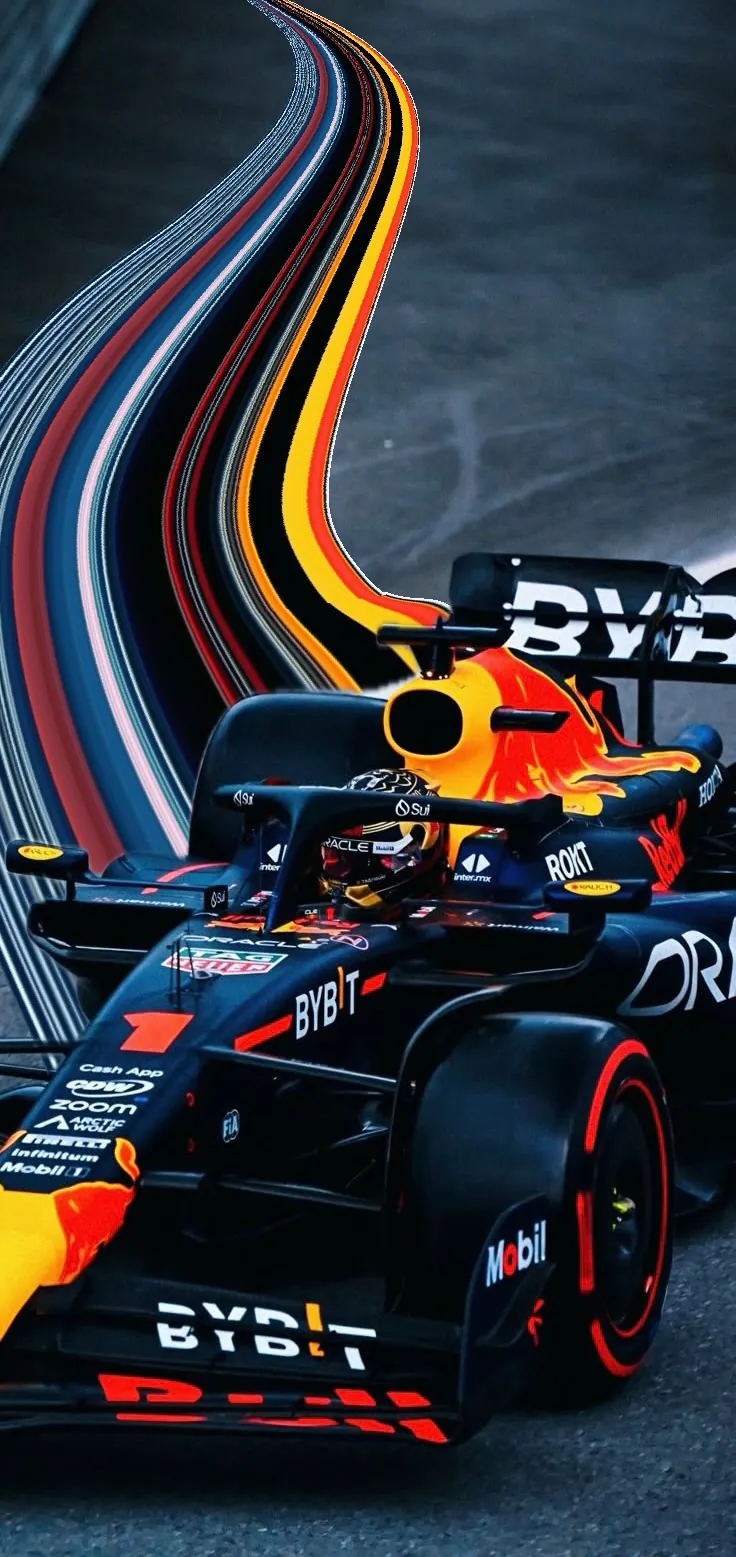
Start at the rear edge. If the ribbon leaves the nose, the car can look as if it is moving backwards. That one decision matters more than how long or complicated the curve becomes.
Choose a frame with somewhere for the color to go
- Leave space behind the car. A side or three-quarter view with open road, track, sky, or wall gives the ribbon a clean route.
- Look for a readable edge. The rear quarter, spoiler, light cluster, or end of a livery stripe gives the sampling bar a convincing launch point.
- Find actual color. Paint, race graphics, reflections, and brake lights stretch better than a large patch of black glass or grey bodywork.
- Keep the car sharp to begin with. The effect adds motion; it cannot rescue missed focus or a weak exposure.
The car edit, step by step
Place the bar on the rear edge
Rotate and resize the sampling bar so it crosses the paint, light, or livery you want to carry into the ribbon. Avoid taking more background than car.
Pull opposite the implied travel
Use the arrow on the trailing side. Tap it for a clean straight streak, or drag along the road or track to sketch a curve that follows the scene.
Set one strong line of motion
Move the blue points until the ribbon reinforces a line already in the frame. A road edge, barrier, horizon, or light trail is usually a better guide than an arbitrary S-shape.
Put the car back in front
Leave Smart Subject on when a subject mask is available, then inspect the roof, wheels, mirrors, and spoiler. The ribbon should feel attached to the car without painting over it.
Taper or Warp the trail
Narrow the finish for speed, or use Warp to open one part of the trail around empty background. Keep the widest section away from the body so the silhouette stays clear.
Check color and save
A touch of Edge hue can separate a dark trail from a similar background; Opacity can settle an overly solid one. Compare with the original, then save a high-resolution copy.
What should you sample from the car?
- Bright paint gives you a clear, graphic band that survives a long pull.
- Livery and sponsor graphics create fine stripes and abrupt color changes, especially on race cars.
- Taillights and brake lights work well in dusk or night shots, where the ribbon can read as a real light trail.
- Reflections can be beautiful but unpredictable. Sample a clean reflected stripe rather than a noisy patch of scenery.
A parked car can still look fast
The source photo does not need motion blur. Direction can come from the stance of the car, the road, or the empty space in the composition. Pull the ribbon behind the vehicle and keep it lower than the roofline. If it arcs forward over the hood, the sense of travel collapses.
Five car-edit mistakes worth avoiding
- The trail leaves the front of the car and fights the implied direction.
- The sampling bar crosses too much road or sky, washing the paint color out.
- The ribbon covers the wheels, roof, or driver instead of sitting behind them.
- Every control point bends in a different direction, so the trail loses its speed.
- The effect is added to a frame that already has nowhere to breathe.
Not every car photo needs the trend. If the original already has strong light, road lines, and motion, a shorter ribbon often adds more than a dramatic one.
For a deeper look at control points, taper, twist, and node width, continue with How to make a curved pixel stretch effect. More subject ideas are collected in Pixel stretch ideas.
Frequently asked
Can I use the pixel stretch effect on a parked car?
Yes. Leave space behind the vehicle, pull from the rear edge, and follow a road or horizon line. The direction of the ribbon creates the motion.
Does a black or white car work?
It can, but look for colored reflections, lights, decals, or a bright background edge. A completely neutral strip produces a flatter ribbon.
How long does a car edit take?
About a minute once you know where the bar goes. Placing it on the rear edge and pulling the trail takes seconds; the time goes into deciding how far the ribbon travels and whether it follows the road or lifts away from it.
Should the stretch come from the front or the rear of the car?
The rear, almost always. A trail leaving the nose reads as if the car is travelling backwards, which fights every other cue in the frame. The one exception is a head-on shot with no implied direction, where a symmetrical pull can work as pure abstraction.
Does it work on motorcycles and race bikes?
Yes, and often better than on cars. Leathers, fairings, and sponsor graphics pack a lot of color into a small area, and a leaning bike hands you the direction of the curve for free. Sample across the fairing rather than the rider.